I have been using del.icio.us since I first heard about it (by reading an announcement of its acquirement by Yahoo!) and I have to confess I was taken by the approach. The only thing I didn’t like was the fact that I didn’t have my bookmarks and the service under control.
Thanks to a note by Erik I found out about Scuttle, an open source clone of del.icio.us which everyone can host on his/her own server. (Please note: scuttle.org only offers their public bookmarking service, the software can only be located at their SourceForge page.) Scuttle is written in PHP and requires MySQL as database backend.
Scuttle offers most of the features of del.icio.us and can even import your bookmarks from there. Some minor usability-issues still arise, but I can live with them. Their API is compatible to del.icio.us so most external del.icio.us applications will work with Scuttle, as long as the tools allow you to specify the URL of the service. Additionally, Scuttle provides three levels of visibility for your bookmarks: public bookmarks, shared with your watchlist (= your friends/colleagues), and private bookmarks.
I installed Scuttle at my company and everyone is busy using it and is happy to now having a central place to store their bookmarks. Del.icio.us was no option for us because all bookmarks are public there.
I can strongly recommend using this software to everyone who wants to have a centralized way for storing their bookmarks without giving away all controls over their bookmarks.
NewsForge has published a nice review of the software.
OpenVPN on Microsoft Windows has a problem with the TAP-Win32-Adapter driver used for the tunnel. The device needs to be deactivated/reactivated after a Windows restart before any connection can be established. In this article I present a very simple script and solution for automating this process.
Read more…
At the moment, Gentoo is experiencing several inconsistency and problems with character sets between MySQL and PHP. This is primarely based on MySQL-4.1 now updating from 4.0 without warning and user interaction which most of the times breaks existing extended characters as MySQL now stores every dump from former databases as UTF-8, which is still badly supported by PHP.
For many PHP web applications which experience problems with extended characters (like umlauts, accents, …), the following hack might help.
- Locate the file where the mysql database connection is opened.
- Add the following commands after opening the database connection:
mysql_query('SET character_set_client=latin1');
mysql_query('SET character_set_results=latin1');
mysql_query('SET character_set_connection=latin1');
This will resume using latin1 instead of UTF-8 for the connection and the result set. For performance reasons, the data in the database should then be stored as latin1 as well.
According to messages in the Gentoo Forum, the developers have now released an ebuild for PHP (both 5.x and 4.4.2) that will regard character-set settings in my.cnf in a section especially for php (still in unstable). You should use the section [php-cli], [php-cgi] and/or [php-apache2handler]. Unfortunately I have not yet had time to test this out.
By default, VMware Workstation 5.x use a memory mapped file for backing the RAM of the simulated machines. This eases the pressure on the system’s page file. If you host the virtual machine on an external drive, however, this can become a bottle neck, especially if the external device is slow (e.g. USB 1.1, flash, etc.).
As described in this VMware Knowledge Base Article, you can turn of VMWare’s behaviour to use a memory mapped file and force it to use the system’s paging mechanism instead. To do so, you just have to add
mainMem.useNamedFile=FALSE
to your virtual machine’s configuration file (.vmx).
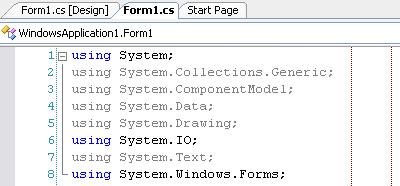
It is still considered good style to keep code-lines within a certain bound (e.g. 80 characters). IDEs like Eclipse offer to display a red guiding line at the chosen offset to help developers keep within this bound.
By modifying the registry a similar guide can be enabled for Visual Studio 2003 / 2005. Add a string value Guides to the key (VS.NET 2005, VS 2003 has version 7.1)
HKEY_CURRENT_USER\Software\Microsoft\VisualStudio\8.0\Text Editor.
Set the value to
RGB(128,0,0) 80
To have multiple guides (like in the screenshot), add the additional columns space delimited, e.g.
RGB(128,0,0) 80 100
Ackn.: This information has been provided by Hannes Pavelka in Microsoft’s newsgroup microsoft.public.dotnet.languages.csharp, Message-ID: <e1jag7$qk7$02$1@news.t-online.com> (Article in Google Groups):